Summary
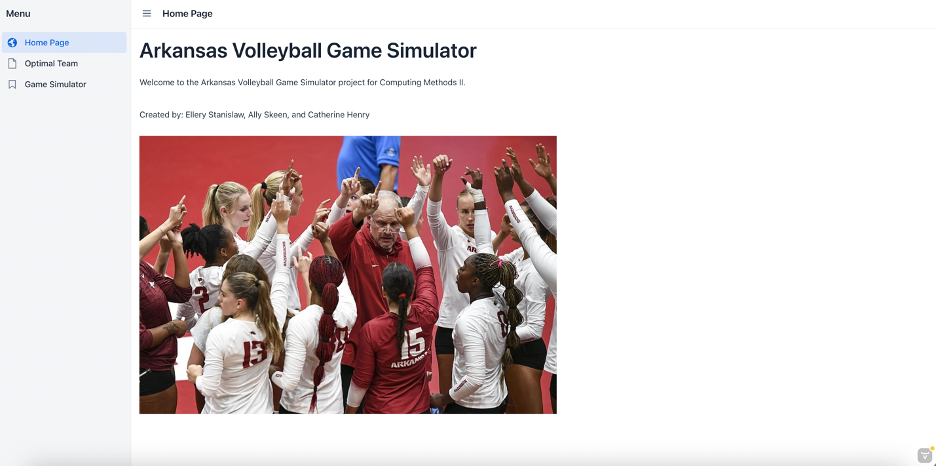
For Computing Methods II our team built an Arkansas Volleyball Game Simulator using Java, Vaadin, and Google OR Tools. The website lets the users explore player statistics, build their own team lineup, and simulate matches against the previous 5 NCAA national championship teams. The data came from real volleyball statistics taken from all six teams that were loaded and cleaned using CSV files.
The Industrial Engineering concept behind this project is optimization. We used a model to mathematically determine the best possible six player lineup of Arkansas volleyball players. Our model ensures that the optimal team revealed is the optimal solution for the highest points. Throughout this project we learned and worked on many skills. We created custom classes one of which was called ArkVolleyball where all the data and player scores were saved. We worked with ArrayLists to store the players data. We also used files through Tablesaw to read the CSV files and convert them to object.
Project Development
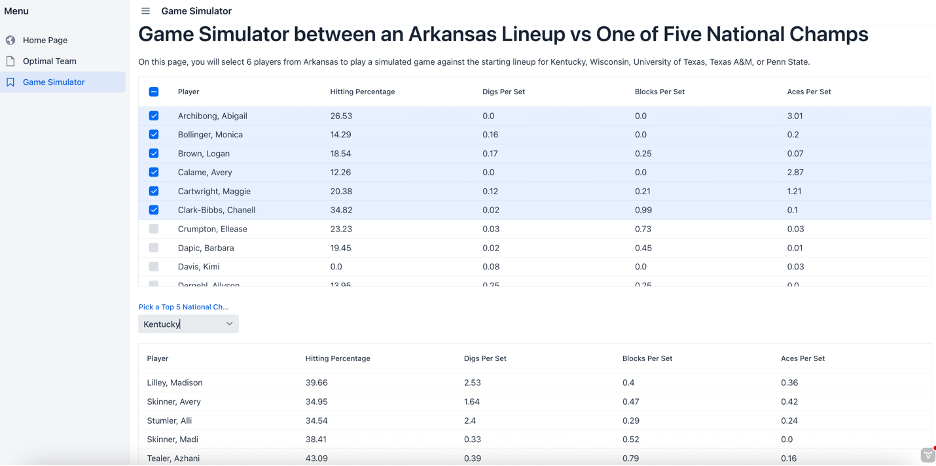
Our original goal was to build a website where the users could pick Arkansas volleyball players and see how their chosen team of six compared to the prefound optimal lineup. We wanted to use Google OR Tools to help with the optimization model but we weren’t really sure how to use it within the website. Once we started working on our code we added the Game Simulator page. Adding this page allowed the project to be more interactive for the user. Instead of just comparing scores the user could actually simulate a real match set by set against a NCAA championship team from the previous 5 years. We also initially started with dropdown menus for the player selection, but it left the user with little information because they were only able to see the players names while picking and not their data. We change our approach to a grid with checkboxes that allowed the users to select their players directly off the grid so they are able to see the data while they selected players.
One of our biggest challenges were trying to integrate the native libraries using Google OR Tools to load correctly. We had to trial and error using our binary decision variables and constraints. We worked through it by breaking the problem down into smaller steps by first getting our solver to run and then adding the six player constraint. Then once we had the constraint and the objective function figure out we had to find a way to add it to Vaadin properly. Another challenge we faced was making sure that all the player statistics were non negative before using our score formula. Some values came out negative because we subtracted some values from hitting percentage. To solve this problem we created a new method called nonNegData() that used Math.abs() for every value to eliminate our problem.
Our final project matched our original vision but ended up easier to use and more revised. We added confetti on the Game Simulator page, the opponents mascot image, and the win probability display were all things we hadn’t originally thought of but made our website even better.
Key Features
Before we were able to run any of our code we needed to turn the players statistics as found into a single number that represented how good they were as a player. We created a formula called calcPlayerScore() where we combined four per set statistics that we thought were valuable in players using weighted percentages. We calculated the hitting percentage and weighted it as 40%, aces per set at 30%, digs per set at 15%, and blocks per set at 15%. These weights were chosen on what we thought reflected a players ability and skill. We felt that offense mattered more, followed by serves, and then defense. This calculation was used throughout our entire project to help compare players and teams.
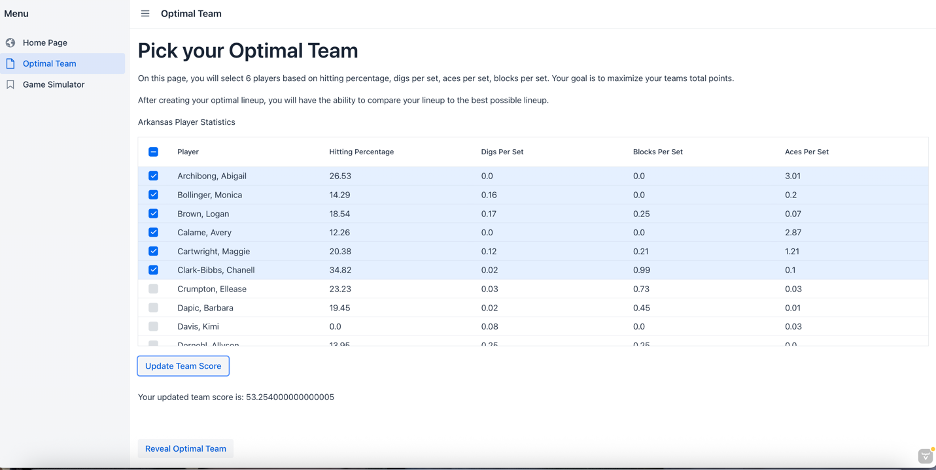
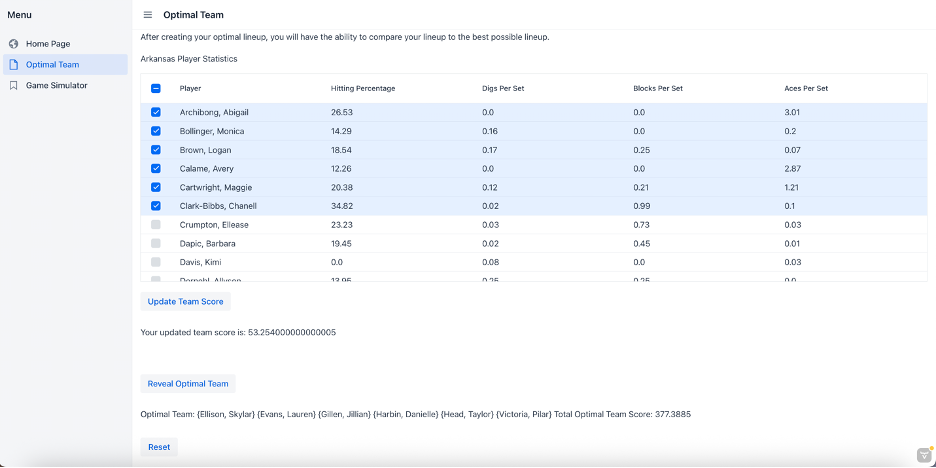
One of the hardest parts of the project was using Google OR Tools in our project to find a mathematically optimal six player team from the Arkansas volleyball player data. It works using a binary decision variables. Each player can either be selected 1, or not selected 0. A constraint was then added to limit it to only 6 players ensuring that there were not extra players. The objective function was to maximize the sum of the players scores. Our SCIP solver then runs and finds the best possible combination of players. It uses mathematical optimization to make sure that the answer is correct and the highest score found. This helps create a visual of what the optimal teams score is for the user to see.
Optimal Team
        Loader.loadNativeLibraries();

        MPSolver solver = MPSolver.createSolver("SCIP");
        int n = reveal.size();

        //Creating a decision variables (0 or 1 for each player) (1 player selected, 0 player not selected)
        MPVariable[] x = new MPVariable[n];
        for (int i = 0; i < n; i++) {
            x[i] = solver.makeIntVar(0, 1, "x_" + i);
        }

        //Constraint that they must select exactly 6 players
        MPConstraint constraint = solver.makeConstraint(6, 6);
        for (int i = 0; i < n; i++) {
            constraint.setCoefficient(x[i], 1);
        }

        //Maximize total score
        MPObjective objective = solver.objective();
        for (int i = 0; i < n; i++) {
            double score = ArkVolleyball.calcPlayerScore(reveal.get(i));
            objective.setCoefficient(x[i], score);
        }
        objective.setMaximization();

        //Solve the optimization problem
        MPSolver.ResultStatus status = solver.solve();
        List<ArkVolleyball> optimalTeam = new ArrayList<>();
        //If solution is valid
        if (status == MPSolver.ResultStatus.OPTIMAL) {
            for (int i = 0; i < n; i++) {
                if (x[i].solutionValue() == 1.0) {
                    optimalTeam.add(reveal.get(i));
                }
            }
            String text = "Optimal Team: \n";
            //String text1 = "Total Optimal Team Score: \n";
            double totalScore = 0.0;
            for (ArkVolleyball t : optimalTeam) {
                text += "{" + t.getPlayer() + "} \n";
                totalScore += ArkVolleyball.calcPlayerScore(t);
            }
            //Displaying the results
            text += "Total Optimal Team Score: " + totalScore;
            revealParagraph.setText(text);
Game Simulator
The Game Simulator page works by first converting each team’s score into a win probability based on how the two teams compare against each other. The match is then simulated set by set until one team wins best of five and each set result is displayed on its own line. If the user’s Arkansas team wins confetti is shown across the screen. If the opponent wins their mascot logo appears instead.
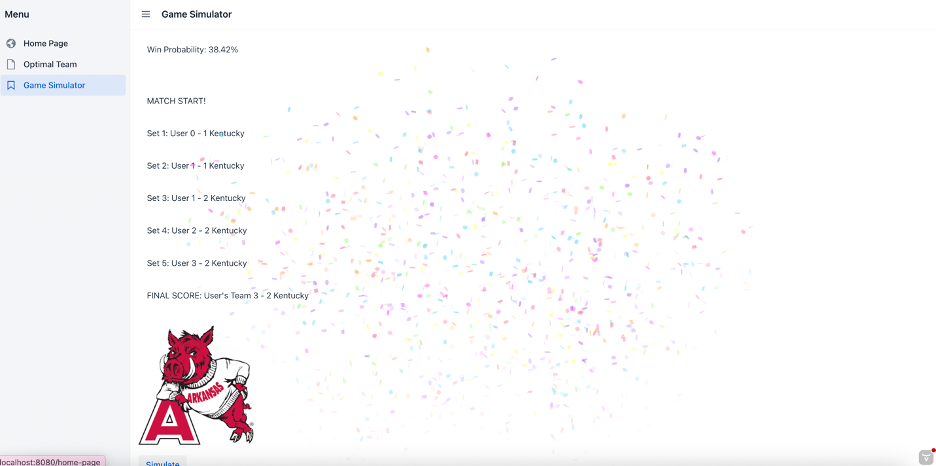
Simulator
int team1Sets = 0; int opponentSets = 0;
    //convert user team in a single score
    double t1Score = TeamGenerator.getTeamScore(team1);
    //opponent team strength
    opponentScore = getOpponentScore(opponentName);

    //win probability before simulation begins
    double winProbability = t1Score / (t1Score + opponentScore);

    //Output the win probability of the user's selected team
    String output = "";
    output += "Opponent: " + opponentName + "\n";
    output += "\nWin Probability: " + String.format("%.2f", winProbability * 100) + "%\n";
    output += "\nMATCH START! ";

    int setNumber = 1;

    //looping until 3 sets are won by one of the two teams
    while (team1Sets < 3 && opponentSets < 3) {
        //converting the team strengths into a probability
        double baseChance = t1Score / (t1Score + opponentScore);
        double finalChance = baseChance; //+ change;
        //ensuring the probabilities stay between 5% and 95% so outcomes like 0% and 100% that are very unlikely don't happen
        //the random coin flip type simulate that is weighted by finalChance, this determines who will win the set
        if (Math.random() < finalChance) {
            team1Sets++;
        } else {
            opponentSets++;
        }
        //Outputting the sets that each team wins
        output += "\nSet " + setNumber + ": User " + team1Sets + " - " + opponentSets + " " + opponentName;
        setNumber++;
    }

    //if the user wins the arkansas image is output and confetti is displayed
    if (team1Sets > opponentSets) {
        Confetti.winBlast();
        imageArea.removeAll();
        imageArea.add(image2);
        return output += "\nFINAL SCORE: User's Team " + team1Sets + " - " + opponentSets + " " + opponentName;
    }
    //if the opponent wins the mascot image is output instead
    else if (opponentSets > team1Sets) {
        if (opponentName.equals("Wisconsin")) {
            imageArea.removeAll();
            imageArea.add(image3);
            return output;
        }
        if (opponentName.equals("Kentucky")) {
            imageArea.removeAll();
            imageArea.add(image4);
            return output;
        }
        if (opponentName.equals("Texas A&M")) {
            imageArea.removeAll();
            imageArea.add(image5);
            return output;
        }
        if (opponentName.equals("University of Texas")) {
            imageArea.removeAll();
            imageArea.add(image6);
            return output;
        }
        if (opponentName.equals("Penn State")) {
            imageArea.removeAll();
            imageArea.add(image7);
            return output;
        }
    } else {
        return output;
    }
    return output;
}Reflection
This project taught me a lot about how important it is to keep your code organized and labeled with comments. By storing all the player data and calculations inside the ArkVolleyball class every other part of the project could just call the method and we didn’t have to keep resolving everything. This made debugging way easier as where knew where to look in the code if something went wrong. I also go a lot better at coding and being able to use multiple different skills learned throughout our course. The thing I am most proud of is getting the OR Tools optimization model to actually work and connect to the website because making a button click listener a activate the solver and display the results took some time and effort. Overall this project made me a lot more confident in my ability to work through problems step by step and build something that actually works from start to finish.